Reactions are here: your fans can now react to your show 💥❤️
Starting today, your fans have a brand-new way to tell you how much they love your show: Reactions. They’re animated effects fans send over your broadcast (hearts, kisses, flirts, coin bombs…), and the whole room sees them at the same time. Each reaction is paid in coins and counts as a tip. In other words: a more visible, more fun and more contagious way to collect coins and liven up your shows.
The six reactions
There are six reactions. You choose which ones are on and what each one costs. These are the prices we suggest, but you can run your show your way and set any amount you like:
| Reaction | What it looks like | Suggested price |
|---|---|---|
| ❤️ Heart | Hearts over your broadcast. | 5,000 |
| 💋 Kiss | A kiss over your broadcast. | 5,000 |
| 😉 Flirt | A neon message over your broadcast, translated into each fan’s language. | 7,500 |
| 💰 Coin bomb | A coin bomb dropping over your broadcast. | 10,000 |
| 💥 Slam | A big hit over your broadcast showing the reaction’s amount. | 15,000 |
| ☢️ Total combo | Every effect chained together: hearts, kisses, confetti, flirt, coin bomb and slam. | 30,000 |
How to turn them on
Reactions are just another bot, so you start them like any other: in the Games tab of your broadcast panel, under Bots, find the Reactions card and click Bot setup.
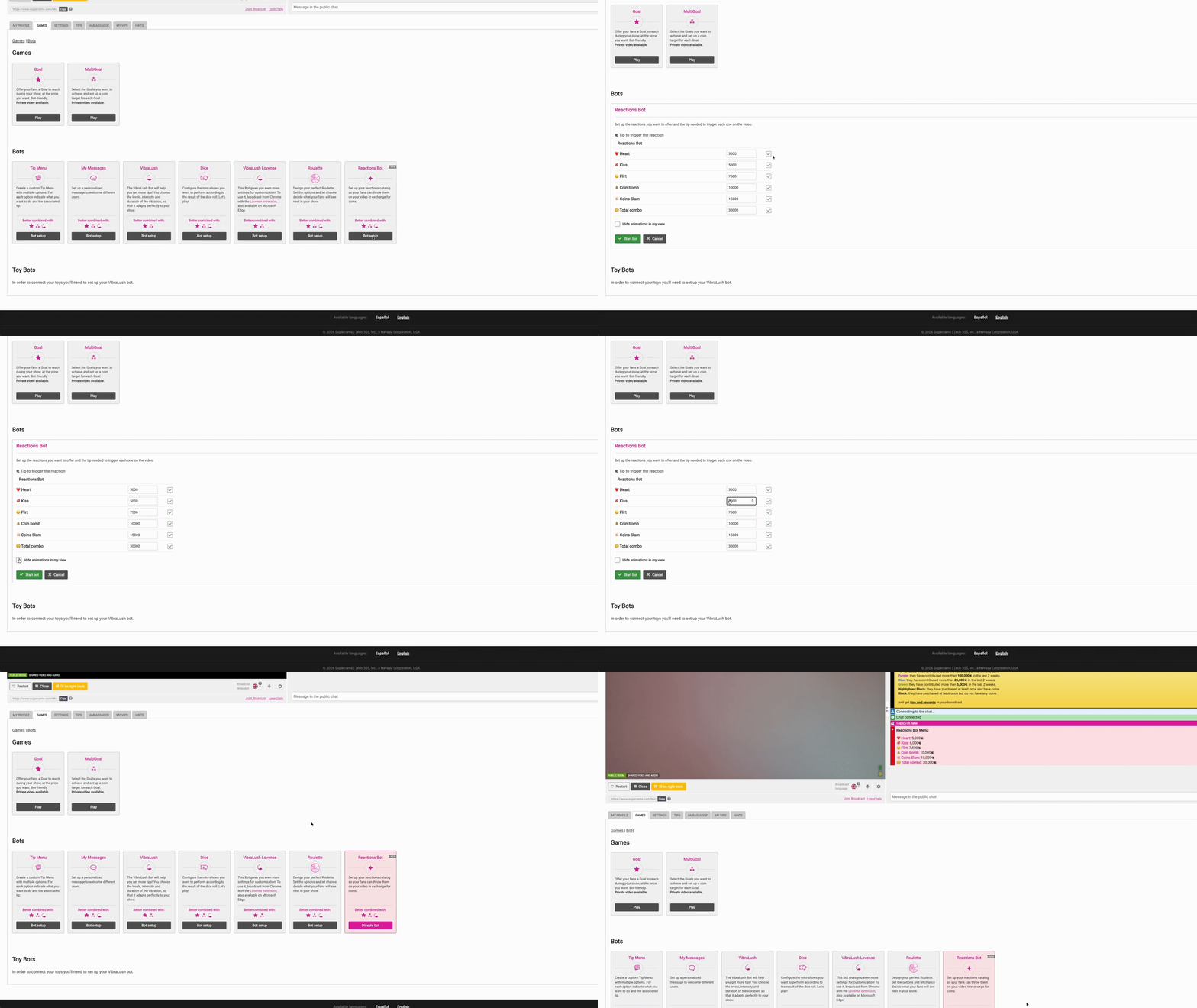
- Turn each reaction on or off individually.
- Set the price you want for each one.
- Start the bot and you’re all set: your menu with your prices posts in the chat.
When you stop it, a closing message appears and reactions can no longer be sent.
How your fans send them
They have three ways to do it:
- The bot’s message in the chat, with one button per reaction (emoji, name and price). It pops up when you start the bot and repeats every so often.
- The button under every reaction another fan sends, to send that same one with a single click.
- The Reactions tab, right where they tip in your room.
Once they tap, the price is charged and the effect lands over your broadcast within a couple of seconds, for the whole room. Each reaction counts as a regular tip for that amount: it adds up toward your Goals, triggers your toy and leaves its tip message in the chat.
What you see
Your chat shows who sent each reaction, followed by their tip. And the reaction’s emoji floats up over your cam as a gentle heads-up, so you never miss one.
Do the animations distract you while you stream? Check the option to hide animations in your view. You stop seeing the effects, but you still see every reaction in your chat, and your fans keep seeing them just the same. The setting is saved for your next broadcasts.

Make the most of them
Your show. Your prices. Their reactions. Ready to see your room full of hearts?